
Microsoft Office 365 Email for Students
Explore reasons to choose Gmail through Google Workspace or Outlook through Microsoft 365 for your email at Cornell.
This article applies to: Cornell Google Workspace for Students , Microsoft Outlook
All incoming Cornell students are set up by default with Gmail through a Cornell Google Workspace for Education account. You also have the option to use Outlook through Microsoft 365 for your Cornell email needs instead.
You might want to consider Microsoft email if:
- You want to use the same service that Cornell faculty and staff use for email and calendaring.
- You do a lot of work in other Cornell Microsoft services like Teams, Planner, or SharePoint, or collaborate in documents or files in Word Online, Excel Online, or PowerPoint Online and want your email in the same Microsoft ecosystem.
- You use Microsoft OneDrive for your online storage and would like easy access to the files for email attachments.
- You want to continue to use the same mail service for your Cornell email address after you graduate. (Cornell Google services end the November after you graduate, while you can continue to have access to Outlook as an alum.)
You have the option to look at Outlook before deciding which system to choose. Log in to Outlook on the web to explore what it offers. If you decide that's the system for you, then change your forwarding with these instructions.
When you go to Outlook on the web you will see a notice at the top right similar to this:
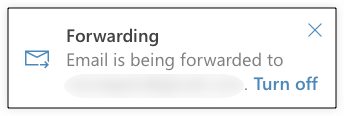
Use the X to close the dialog box.
Clicking "Turn off" will stop your email forwarding completely and then you won't get any email in Google Workspace. If you decide to use Outlook for your email needs, you will deal with this alert box when you change your forwarding.
Transitioning from one email service to another can have some confusing points, so you'll want to decide whether the change from Gmail to Outlook is worth the effort, and plan out how you would make the switch.
By default all Cornell email first arrives to Outlook and is forwarded to Gmail. A copy of the email stays in Outlook. If you decide to switch to Outlook you will see all of the email you've received since starting at Cornell sitting in your Outlook inbox unread. The Outlook and Gmail accounts are separate, so any organization from Gmail will not exist in Outlook. You will have to re-create folders and filters, and you will not have a copy of any outgoing emails that you have sent from your Gmail account.
Comments?
To share feedback about this page or request support, log in with your NetID