
Leave E-lists (Lyris)
This article applies to: E-lists (Lyris)
To leave an e-list (also called unsubscribing), send an email message to
listname-request@cornell.edu
where listname is the name of the list you want to leave, including the hyphen and the letter L at the end of the list name. You follow this with another hyphen and the word request.
For the Subject of your message, type the single word
leave
Leave the body of the message blank. 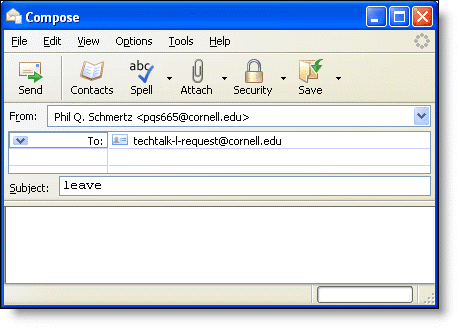
You must send this message from the email address where you receive the e-list's messages.
The message must be sent in plain text.
A short time after sending this message, you may receive a confirmation request. Follow the instructions in the request (which involves replying to the message or clicking on a web link).
Didn't Work?
If you follow these steps and continue to receive messages from the list
OR
If you no longer have access to the email address where you received messages from the list,
contact the list's owner by sending a message to owner-listname@cornell.edu
where listname is the name of the list you want to leave, including the hyphen and the letter L at the end of the list name.
Explain your situation, and be sure to include the name of the list (the owner may have many lists) and the email address where you received list messages.
Comments?
To share feedback about this page or request support, log in with your NetID