
Join E-lists (Lyris)
This article applies to: E-lists (Lyris)
To join an e-list (also called subscribing), send an email message to
listname-request@cornell.edu
where listname is the name of the list you want to join, including the hyphen and the letter L at the end of the list name.
For the Subject of your message, type the single word
join
Leave the body of the message blank. 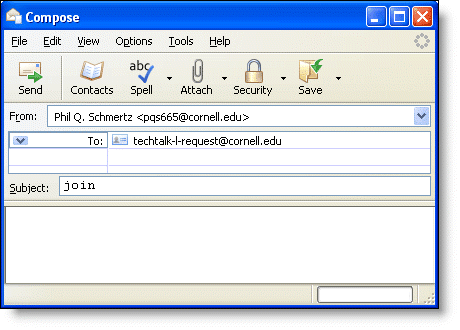
You must send this message from the email address where you want to receive the e-list's messages.
A short time after sending this message, you may receive a confirmation request (it depends on whether the list administrator requires confirmation). Follow the instructions in the request (which involves replying to the message or clicking on a web link). The confirmation process helps ensure that only people who want to join a list receive the list's messages.
Please note that you may not be added to the e-list immediately, as lists can be configured in a number of ways:
- Some e-lists have open membership: anyone can join just by using the "join" command and then confirming.
- Some e-lists have private membership: you can use the "join" command, but it serves as a request to join, which must then be approved by a list administrator.
- Some e-lists have closed membership: only list administrators can add new members; the "join" command will not work, and the list's administrators will not be notified that you tried to join. You should contact the list administrators to discuss whether you can join the list. Contact the admins by sending a message to
owner-listname@cornell.edu
where listname is the name of the list you want to join, including the hyphen and the letter L at the end of the list name. For example, owner-sheep-shearing-L@cornell.edu
Comments?
To share feedback about this page or request support, log in with your NetID